

- Crawling - Glean fetches data from your connected apps.
- Indexing - Glean creates a model of the data that was fetched and incorporates it into your organization’s search index.
- Learning - Glean processes the data that was fetched using Machine Learning (ML) to create a search and ranking algorithm tailored to your organization’s data and users.
Timelines for Completion
The time required to complete all 3 processes will vary depending on the size of your organization and the volume of content that Glean needs to process. The combined crawling and indexing processes can take approximately:- 2-3 days to complete for a typical small organization, or small volume of content.
- 10-14 days for a typical large organization, or large volume of content.
- The GCP or AWS region that your Glean tenant was deployed to (and the tier of TPU/GPU hardware available in that region).
- The amount of content that needs to be processed as part of each M/L workflow.
About Crawling & Indexing
When you initiate a crawl for a data source for the first time, the crawling and indexing processes are initiated. During this time, Glean will:- Crawl the content (and associated permissions & activity metadata) for the selected data source.
- Create the Glean Knowledge Graph by indexing the crawled content, mapping it together, and creating a real-time model that can be referred to in response to a user’s query.
Crawling is the process in which Glean fetches data from within your organization’s sources of data for the purposes of creating the search index.The Knowledge Graph is a real-time model of your organization’s indexed information. It is a map that links all content, people, permissions, language, and activity within your organization. It is designed to provide users with the most personalized and relevant results for their queries in a matter of milliseconds.Indexing is the process in which Glean makes content ready for display in search results by creating (or updating) your organization’s Knowledge Graph: the mapping between all content, people, permissions, language, and activity in the company.
Checking the Crawling & Indexing Status
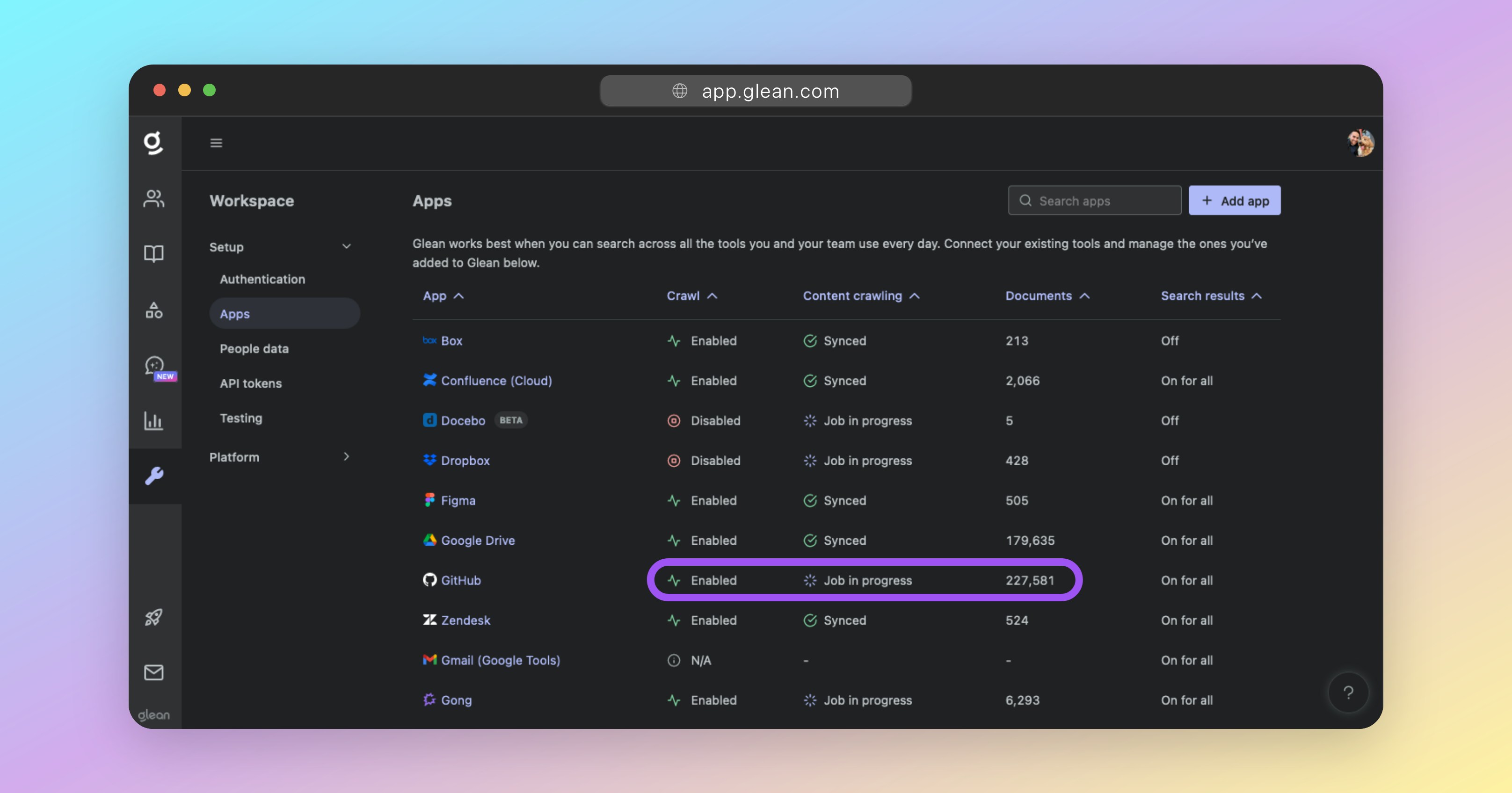
You can check the status of your in-progress crawls at any time by going to Admin Console > Data sources and reviewing the table of configured apps. When a data source is undergoing its initial sync, it will appear under the Initial sync in progress section, which is split into two phases:- Crawling (step 1/2) - Glean is actively fetching content and metadata from the data source.
- Indexing (step 2/2) - Glean is processing the crawled content and incorporating it into the Knowledge Graph.
- Items synced - The total number of items (documents, messages, files, etc.) that have been crawled and indexed.
- Change rate (items/day) - The number of changes (edits, additions, deletions) synced in the past 24 hours, reflecting ongoing freshness after initial sync completes.
Status and metrics refresh on an hourly cadence. If you don’t see immediate updates after making changes, check back in about an hour.
Crawling & Indexing FAQ
How long does the initial crawl and index process take to complete?
How long does the initial crawl and index process take to complete?
Crawling (Step 1/2)The initial crawl for any datasource will always take a while; the total time of which is dependent on two key factors:The size of the datasource (eg: number of documents/messages, and the size of each).
The rate limit(s) of the datasource vendor’s API.If a datasource vendor’s API has a low rate limit, this will affect how quickly Glean can crawl it for items. Likewise, datasources containing a large number of documents, files, or messages, will also take longer to crawl.Some datasources share a rate limit across all integrated applications (like Glean). For these datasources, crawling time is typically slower, as Glean must be careful not to exhaust the entire rate limit threshold itself.You can monitor crawling progress by checking the Initial sync in progress section under Crawling (step 1/2) and watching the Items synced metric increase.Indexing (Step 2/2)The indexing process works in parallel with the crawling process. That is, content that has been crawled is processed by Glean’s indexer while other content is still being crawled.While the crawling speed is heavily dependent on the volume of data AND the API rate limit, the indexing speed is conversely heavily dependent on compute resources. The health of each deployment’s index and compute resources dedicated to the indexing process is carefully monitored by Glean’s SRE team.Once crawling begins to complete, you’ll see the data source move to the Indexing (step 2/2) phase in the Initial sync in progress section.Total Time RequiredFor a typical enterprise datasource, expect the complete initial crawling and indexing processes to take anywhere from 3 days, up to 14 days for large datasources with moderate API rate limits. Once both phases complete, the data source will move to the All data sources section.
Can multiple data sources be crawled at the same time without impact?
Can multiple data sources be crawled at the same time without impact?
Yes. Each data source configured has its own unique crawler that dynamically scales based on demand. This ensures that multiple datas ources can be crawled in parallel without impact to the time required to complete each crawl.
What happens if a document is modified while a crawl is in progress?
What happens if a document is modified while a crawl is in progress?
When a full (initial) crawl of a data source is initiated, it captures the state of all documents and content up to the exact timestamp when the crawl started. If any documents are modified or created after this timestamp, they will be processed and incorporated into the search index in one of two ways:
- Webhooks: Most datasources support webhooks, which Glean leverages to be notified of any content changes. When a webhook is received, it is processed within 1-5 minutes, depending on the datasource.
- Incremental Crawls: Glean performs an incremental crawl of each datasource every 24 hours. These crawls focus on identifying and incorporating changes that have occurred since the last crawl that were not captured via webhooks. This ensures that all recent modifications are captured.
How to verify if a document is crawled and indexed?
How to verify if a document is crawled and indexed?
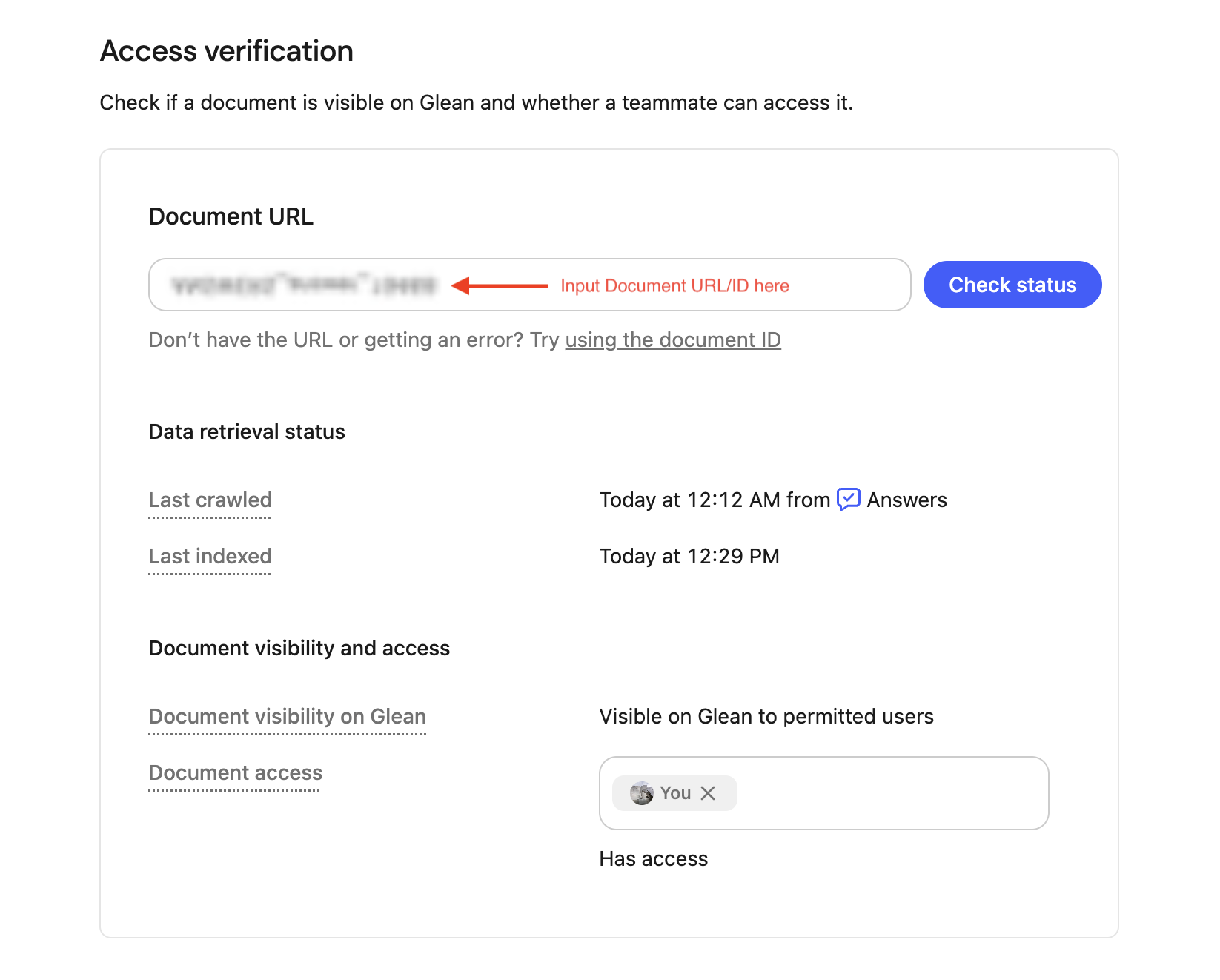
The Access Verification page allows admins to resolve questions related to the visibility of specific documents within Glean. With this tool, admins can determine a document’s latest status or detect if a document is visible in Glean across users or test individual user access.Navigate to Admin Console >> Glean Protect >> Access verification.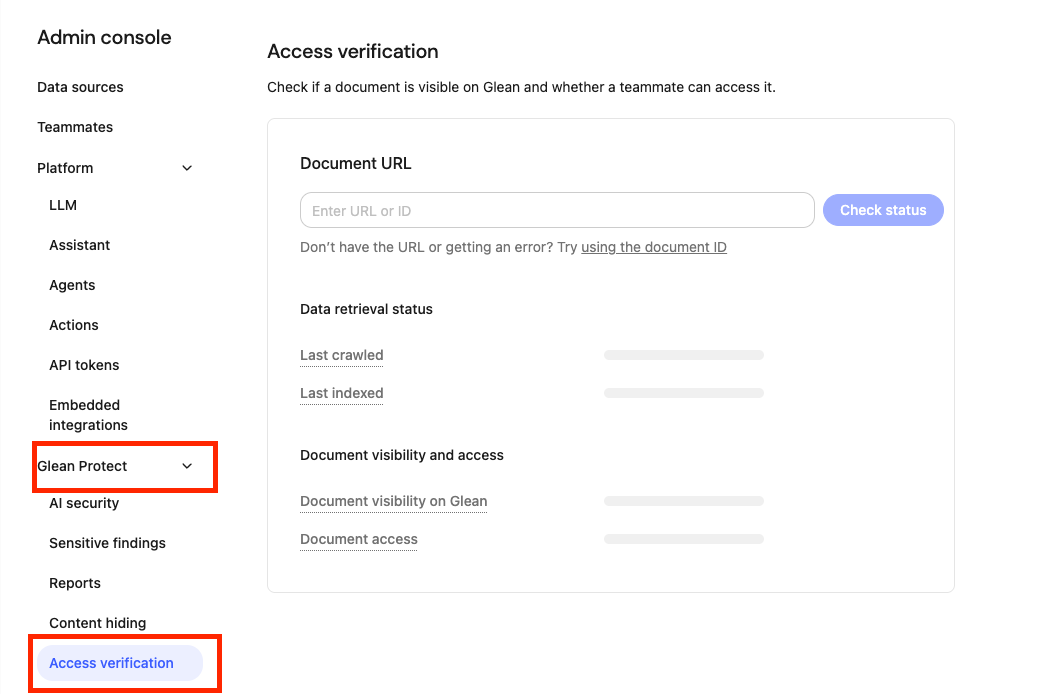
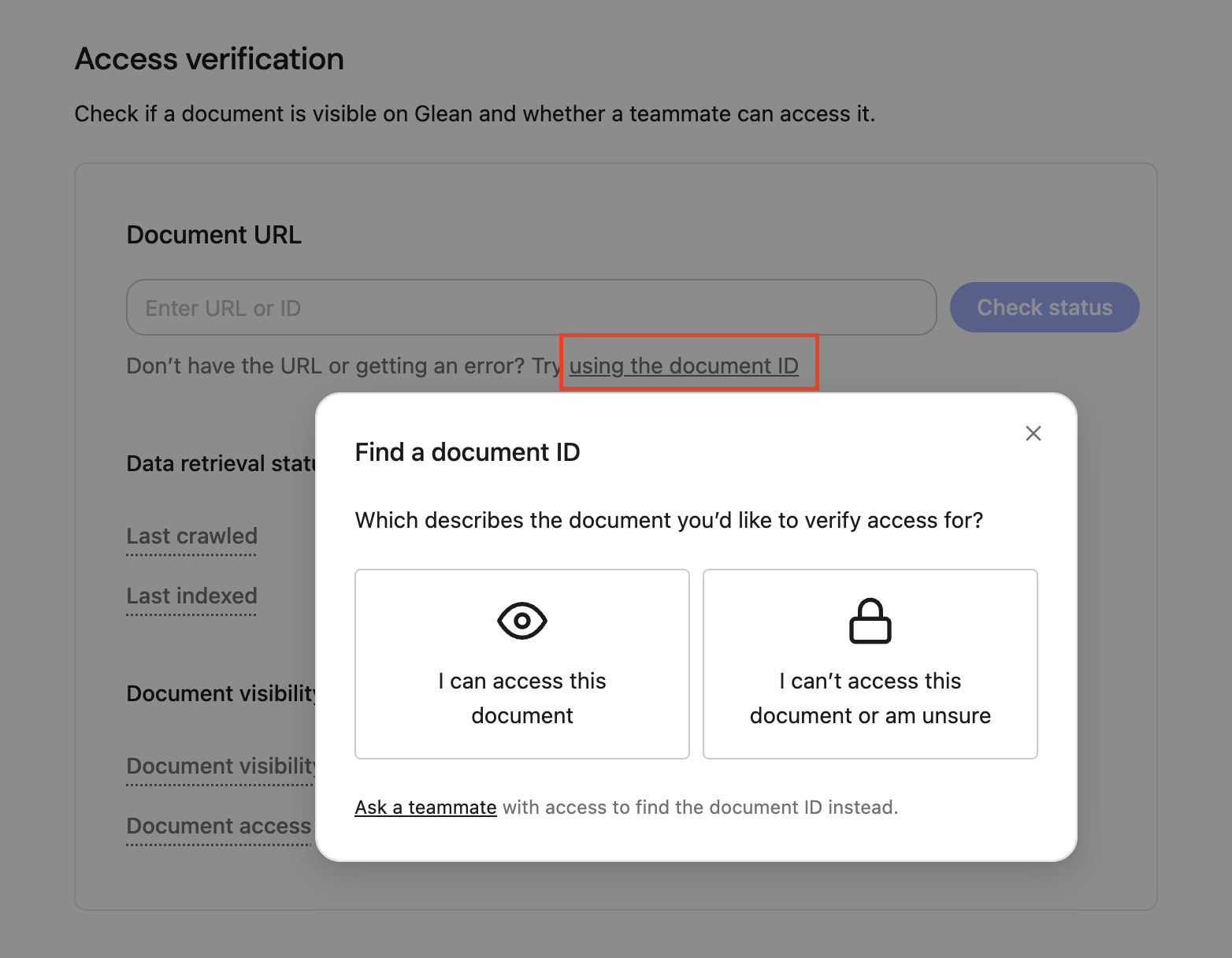
- Last crawled – when Glean last scanned the file for changes.
- Last indexed – when Glean last added those changes to search.
- Document visibility on Glean – whether the document is currently visible or hidden to users on Glean.
- Document access – you can use the teammate selector to check an individual user’s access to the document: “Full access” (the user can open it) or “No access” (the user cannot)
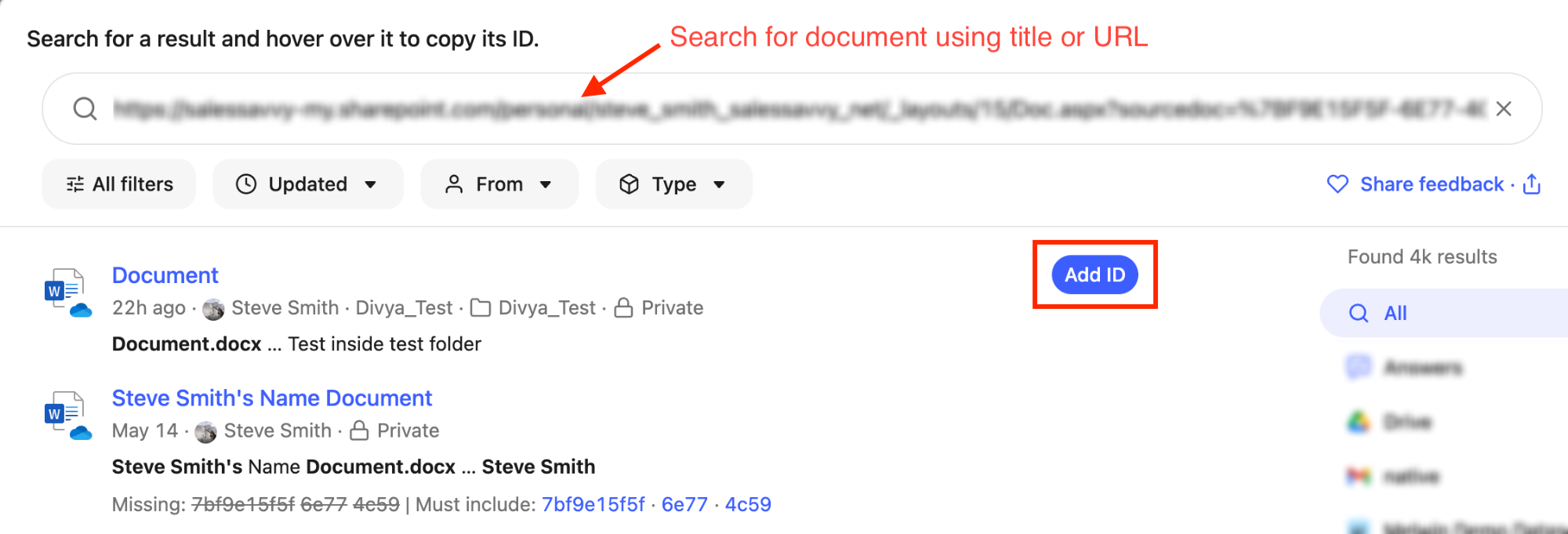
A “document ID” in Glean is a unique identifier automatically assigned to a document upon its successful crawling into the system.
How do I interpret slow or stalled progress during crawling and indexing?
How do I interpret slow or stalled progress during crawling and indexing?
If you are experiencing slow or stalled progress during crawling and indexing, refer to the Using metrics for troubleshooting section of the monitoring page to diagnose the issue.
About Machine Learning
Once the crawling and indexing processes have been completed, Glean will initiate several Machine Learning (ML) workflows that will run on all indexed content. The ML process is critically important and is responsible for:- Optimizing search query understanding and spellcheck.
- Understanding synonyms, acronyms, and semantics used in documents and between employees within your organization.
- Enhancing relevance rankings for search results and people suggestions.
- Enabling query suggestions, predictive text, and autocomplete.
- Training the unique language model for your organization; which is essential for operation of Glean Chat and Glean Assistant.
Checking the Machine Learning (ML) Status
The ML workflows are background processes - it is not currently possible to check the status of these inside the Glean UI.Your Glean engineer will notify you on the progress of these workflows and when they complete successfully.
Machine Learning (ML) FAQ
How long does the ML process take to complete?
How long does the ML process take to complete?
Completing all required ML workflows can take 2-14 days in total, depending on:
- The amount of content that needs to be processed as part of each ML workflow.
- The GCP or AWS region that your Glean tenant was deployed to (and the tier of TPU/GPU hardware available in that region).
- For example, using an Nvidia T4 GPU (if that is all that is supported in your elected deployment region) instead of a dedicated TPU typically increases the time required to run all ML workflows by a factor of 4-6x.
Does the ML process run in parallel with the crawl/index processes?
Does the ML process run in parallel with the crawl/index processes?
No. The ML workflows must be run on a complete dataset. Hence, Glean cannot initiate the ML process until all of your data sources have been crawled and indexed.
What is the impact if the ML process is not completed?
What is the impact if the ML process is not completed?
- Search results will be significantly degraded.
- Glean Assistant and Glean Chat will not respond correctly.
- Spellcheck will be errornous.
- Autocomplete will not function.
- Any synonyms or acronyms used within the organization will not be understood if included in a search query.