

Supported features
The Glean Website Connector functions as a configurable web crawler that fetches content from websites and makes it discoverable in Glean. It is ideal for bringing in content from sources that lack a native product connector. The data source supports:- HTTP(S) endpoints for public or authenticated web content.
- Standard authentication schemes:
- Basic or bearer authentication.
- Custom headers, for example, for API tokens.
- Cookies.
- NTLMv2 (for Windows-authenticated resources).
- Optional Client-Side Rendering (CSR) using Chrome to extract JavaScript-generated content for public, unauthenticated pages on both GCP and AWS deployments.
- Respects robots.txt for crawl compliance.
Supported objects
- HTML web pages through HTTP or HTTPS.
- Content reachable through crawled links or listed in provided sitemaps.
Limitations
- Pages that render content using JavaScript in the browser require Client‑Side Rendering (CSR). CSR captures the rendered HTML but has limited support for advanced dynamic behaviors or animations.
- Does not support crawling password-protected content without proper credentials.
- CSR cannot be combined with cookies, authentication headers, or Single Sign-On (SSO) in the current version. Therefore, JavaScript-rendered pages that require login or an authenticated browser session are not supported. Use CSR only for public pages that do not require authentication.
- Dynamic web page indexing is not supported on:
- For password protected websites
- On-prem websites which are accessed via VPN
Crawling strategy
| Crawl type | Full Crawl | Incremental Crawl | People Data | Activity | Update Rate | Webhook | Notes |
|---|---|---|---|---|---|---|---|
| Seed Crawl | Yes | No | No | No | Configurable by Glean support (default 28 days) | No | Uses user-specified seed URLs and regex filters |
| Sitemap Crawl | Yes | No | No | No | Configurable by Glean support (default 28 days) | No | Uses sitemap.xml for discovery |
| Client-Side Rendering | Yes | No | No | No | Configurable by Glean support (default 28 days) | No | For JavaScript-heavy sites, requires enabling CSR |
Requirements
The following requirements must be met before you begin configuring the Glean Web Connector.Technical requirements
- The target website must be accessible from the Glean platform either public or through appropriate network configuration.
- Supported protocols are HTTP or HTTPS.
- Website data source must be accessible by Glean through a network configuration like VPN.
- If Client-Side Rendering is needed, ensure the site is compatible with headless Chrome for JavaScript execution.
- Network access and firewall allowlisting: If your website is protected by firewalls, IP allowlists, or a web application firewall (WAF), you must allowlist your Glean instance’s egress IPs so that the Website data source can connect Glean’s public proxy external IP. These IPs are required for successful validation and crawling of internal or IP‑restricted websites. Contact Glean Support to retrieve your instance’s public proxy external IP, and share them with your network team so they can be added to the appropriate firewall or WAF allowlists.
Credential requirements
To crawl protected content, you must provide appropriate credentials using one of the following supported methods:- Basic authentication (username/password).
- Bearer tokens or custom headers.
- Cookies (for session-based authentication).
- NTLMv2 (requires domain, username, and password).
Permission requirements
- The Website data source does not enforce or propagate fine-grained document permissions from the source website.
- Any web page accessible based on provided credentials is indexed and made discoverable to all the users in Glean as configured.
- Access to Website data source is granted to all users by default. To restrict an internal‑only website, configure product access groups and assign the data source to those groups.
Setup instructions
Perform the following steps to configure Website datasource.Prerequisites
- Admin access to your Glean environment.
- Access to the target website and its sitemap (if applicable).
- Credentials and/or network routing.
Step 1. Add Website data source
- Navigate to the Glean admin console.
- Go to Data sources tab in the admin console.
- Click Add data source and select Website.
- Enter a display name and optionally provide an icon.
Step 2. Choose a crawl method
Decide how Glean should discover pages for this site, then enter the details for that method.| Method | When to use | Setup action |
|---|---|---|
| Sitemap | When your site exposes a maintained sitemap. | In Sitemap URL, enter the full URL of the sitemap. For example, https://www.example.com/sitemap.xml |
| Seed URLs | For sites without a reliable sitemap or when indexing only a specific section. | In Seed URLs, enter one or more starting URLs that sit at the top of the area you want to crawl. For example: https://internal.example.com/handbook/ https://docs.example.com/product-x/ Glean starts from each seed URL and follows links to child pages until it reaches the configured crawl limits. If you later need to narrow or expand what is crawled from these seeds, you can use Advanced settings > URL settings to add URL patterns (regex) that include or exclude specific paths. |
(Optional) Step 3: Configure advanced settings
The Advanced setup is collapsed by default, click Advanced settings dropdown to see the configuration options. Use the advance setup options only when setup fails validation, when troubleshooting crawl behavior, or when you must override defaults for a specific site.
Authentication
Choose how Glean should authenticate to the site. The fields that appear depend on the option you select.Glean does not support any cookies or authentication mechanisms With CSR.
- None: Select this for public sites that do not require login or special headers.
-
Basic authentication: Select this when the site accepts a username and password over HTTP(S).
- Enter the service account Username and Password that has access to the pages you want to crawl.
- OAuth: Select this when access to the site is controlled by an OAuth 2.0 provider (for example, your company’s identity provider or the site’s own OAuth app). If you enable Dynamic rendering (CSR), sensitive headers are cleared because they will not take effect with CSR.
- Work with the owner of the website or your identity provider admin to set up an OAuth client outside Glean (e.g., in Okta, Azure AD, or the website’s admin console).
- Once the OAuth client is created, copy the client details that the provider gives you.
- Only an administrator with Glean access should enter these values directly into the Glean Admin Console. Do not share secrets via insecure channels.
OAuth fields
When you select OAuth, configure the following fields using the values from your OAuth provider:-
OAuth base URL: Base URL of the OAuth server that issues and refreshes tokens, for example:
https://login.example.comorhttps://auth.example.com. All token endpoints you configure should live under this base URL. -
OAuth access token request endpoint: Endpoint used to obtain an access token (for example, for the
client_credentialsgrant). Enter the access‑token request endpoint documented by your provider. This can be a full URL or, if your provider documents it that way, a path relative to the OAuth base URL, for example:/oauth2/tokenorhttps://login.example.com/oauth2/token. -
OAuth refresh token request endpoint: Endpoint used to exchange a refresh token for a new access token. Enter the refresh‑token endpoint documented by your provider. This should be relative to the OAuth base URL when you use a path, for example:
/oauth2/token. -
OAuth audience: Audience or resource identifier required by some providers for the
client_credentialsflow. Enter the audience value from your OAuth client configuration, for example:https://api.example.com/. - Client ID: The OAuth client ID from your OAuth app registration. Copy it exactly as shown in your identity provider (IdP) or site configuration.
- Client secret: The OAuth client secret from your OAuth app registration. Paste it directly into this field from your IdP or site admin console. Treat this as sensitive and avoid sharing it outside Glean admin.
- Access token: Enter the access token here as provided by your OAuth/IdP admin.
-
OAuth scope (optional): Scopes to request for the access token, as configured for your OAuth client. Use the exact value or list of scopes required by the site, for example:
read,read write, orapi.read. - OAuth refresh token period (seconds) (optional): Frequency at which the access token should be refreshed. Use the value recommended by your OAuth/IdP admin, or leave the default unless you have a specific requirement.
- Refresh token (optional): If your setup uses a refresh token flow, paste the refresh token here as provided by your OAuth/IdP admin.
-
Sensitive headers (optional): Provide headers as CSV key,value pairs. Comma‑separated list of HTTP headers to send with crawl requests for this site, for example:
X-Api-Key,abc123,X-Org,example-inc
Use this only when the site owner explicitly requires headers (for example, to satisfy firewall or WAF rules). Do not include secrets here unless instructed by your security team.
URL settings (for Seed crawl)
This section is available only when Crawl method is set to Seed crawl. Use it to control how URLs are normalized before crawling and which URLs are indexed.-
Convert http to https: Select this if
http://URLs should automatically be converted tohttps://before crawling. Use when the site is served over HTTPS and you want a single canonical form of each URL. -
Strip trailing slash: Remove a trailing
/from URLs during normalization, for example:https://example.com/page/→https://example.com/page. -
Strip fragment with query parameters: When a URL has both query parameters and a fragment (the
#...part), remove the fragment portion. Use this when the fragment does not change the page content and you want to avoid duplicate URLs. -
Strip all query parameters: Remove the entire query string from URLs before crawling. Use this only if query parameters do not affect the content (for example, tracking parameters like
utm_source). -
Greenlisted query parameters: Comma‑separated list of query parameters that must be preserved even if other parameters are stripped.Example:
id,page,lang
Use this when certain parameters are required to load the correct content (such as item IDs, pagination, or locale). -
URL Regex: Regular expression pattern for URLs that should be indexed. URLs that do not match are skipped. Examples:
- Include only docs under
/product-x/:
https://docs.example.com/product-x/.* - Exclude admin paths (by pairing this with appropriate seeds and greenlists):
^(?!.*\/admin\/).*$
- Include only docs under
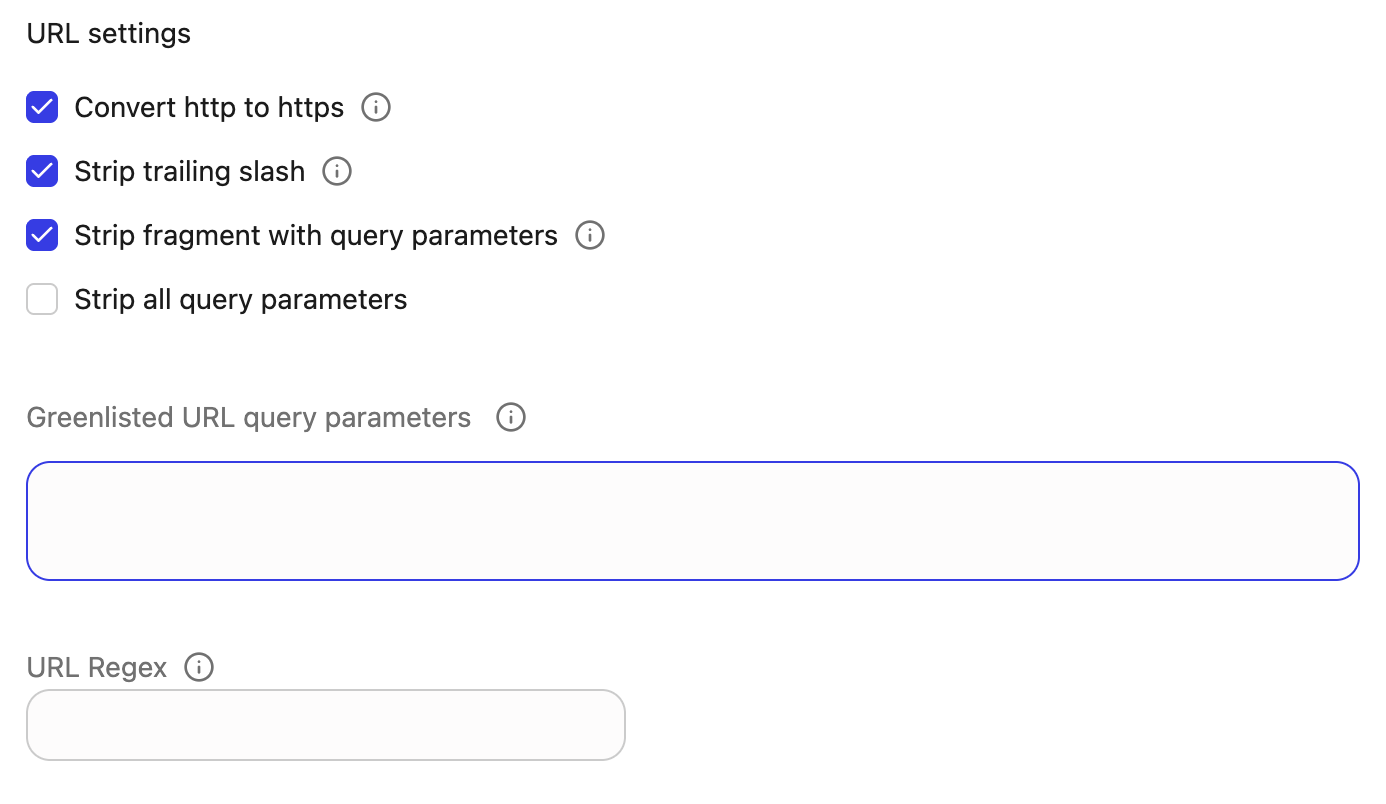
Crawling options
Use these options to control how the crawler behaves:-
Honor robots.txt: Keep this enabled unless you have explicit approval to ignore
robots.txtfor this site. This ensures the crawl respects the site’s published rules. - Dynamic rendered crawl (CSR): Enable this when pages rely heavily on client‑side JavaScript and can be crawled without authentication headers or cookies. CSR is not supported for some deployment types and for certain private or VPN‑only sites. If a CSR crawl fails for your site, revert to standard crawling.
-
Sitemap options: These options apply only if you selected Sitemap crawl:
- Red list: List of sitemap URL patterns to exclude from crawling. Provide values only if you have specific sitemap URLs you do not want Glean to index.
- Namespace enabled: Controls whether sitemap XML namespaces are handled according to the default behavior. Change this only if you have been instructed to do so for a non‑standard sitemap format; otherwise, leave the default value.
- User agent: Leave the default user agent unless your security or WAF rules require a custom value. If a custom user agent is needed, coordinate with the team that owns the target site and enter the exact value they provide.
Step 4. Save the data source configuration
- Click Save.
Step 5. Trigger initial crawl
- Trigger the initial crawl. Review results and adjust crawling scope or credential setup as needed.
-
For internal or IP‑restricted websites, coordinate with your network team before triggering the initial crawl to ensure:
- Any required VPN or private routing is active, and
- Your Glean instance’s public proxy external IP have been added to the relevant firewall or WAF allowlists for the target site.
Additional information
- Start with defaults. Only use Advanced settings to address validation errors or site-specific needs.
- Prefer URL Regex and allowlists to fine-tune scope rather than disabling robots or overusing red lists.
- If a site requires headers (e.g., firewall or WAF rules), add them as Sensitive headers under your selected authentication method. Do not enable CSR in that case.
- Keep overrides minimal so product-wide default improvements continue to benefit your deployment.
Permissions & security
Data and Metadata Ingested: The connector collects all HTML content and associated metadata like titles, URLs, limited to pages reachable through configured seeds, sitemaps, and allowed by credential scope. No people or activity data is ingested from websites, and the connector does not fetch or propagate per-user permissions for crawled content. Permission Propagation Logic: All users with access to the Glean data source can search and view indexed pages, subject to the crawl configuration and any source-side authentication applied during crawl. Security & Compliance Notes: All data transfer is encrypted in transit. Credentials are stored securely in Glean. The connector respects robots.txt unless explicitly configured to ignore it. The data is isolated within the your tenant and private data is protected through the initial credentialing and network configuration steps. Known Security Restrictions:- The connector does not support per-user source system permissions mapping.
- On multi-instance or highly restricted networks, connectivity may require IT/admin coordination.
Troubleshooting steps
-
Getting validation failures on saving the configuration.
- Expand Advanced and apply only the minimum required overrides (e.g., URL normalization or user agent).
-
Auth works but pages are not indexed
- Verify robots is honored as intended, check URL Regex, and confirm you have not stripped necessary query parameters.
-
JavaScript-heavy pages not rendering
- Try enabling CSR only if you can use no authentication and your deployment supports CSR. CSR is supported on both GCP and AWS deployments for public pages. If a CSR crawl still fails for your site, revert to standard crawling or contact Glean Support.
- If the site requires auth or headers, do not use CSR.